Introducing NAVOS in greytHR: Smarter answers, faster actions
Updated in March - 2026 | Subscribe to watch greytHR how-to video
The greytHR platform is packed with powerful features that simplify your HR tasks. However, in your day-to-day use, you may sometimes spend extra time navigating multiple steps or finding what you need, leading to a loss of time.
To solve this, greytHR introduces NAVOS — an AI assistant built right into the platform that provides instant answers, guides you to features, and makes greytHR more intuitive and user-friendly. It helps you work faster, boost productivity, and get more things done with ease.
What is NAVOS ?
NAVOS is an AI-driven system that enhances the user experience across the entire greytHR platform. It’s not a single feature, but a collection of interconnected capabilities designed to make greytHR smarter, simpler, and more intuitive.
AI-Enriched Search: A universal search bar that understands natural language queries and delivers relevant results across modules, employee directory, reports, system pages, settings, partner apps, knowledge base, and support.
AI Co-pilot: An AI assistant that helps users complete critical or complex actions instantly.
For example, earlier, to add LOP for an employee, you had to navigate through Payroll > Payroll Inputs > Employee LOP Days > Add LOP Days and then select the employee to enter details.
With the NAVOS, you can simply type “Add LOP for [employee name] on [date]”, and it will take you directly to the Employee LOP Days page—no manual navigation needed. The Co-pilot does it for you automatically.
AI-Enriched Chatbot: A responsive, context-aware chatbot that provides conversational answers, helping users resolve queries faster than traditional support bots.
Watch this video to know more about NAVOS.
Benefits of using the NAVOS
Enhances efficiency and productivity by reducing time spent searching and automating tasks.
Provides instant answers to queries through an AI-powered chatbot.
Helps discover hidden features within greytHR.
Simplifies navigation with a universal search bar and intelligent assistant.
Reduces support dependency by resolving routine queries instantly.
Maximizes the overall value and usage of the greytHR platform.
Start search using NAVOS
You can initiate a search with NAVOS through either the search bar or the chat interface, depending on your task or query.
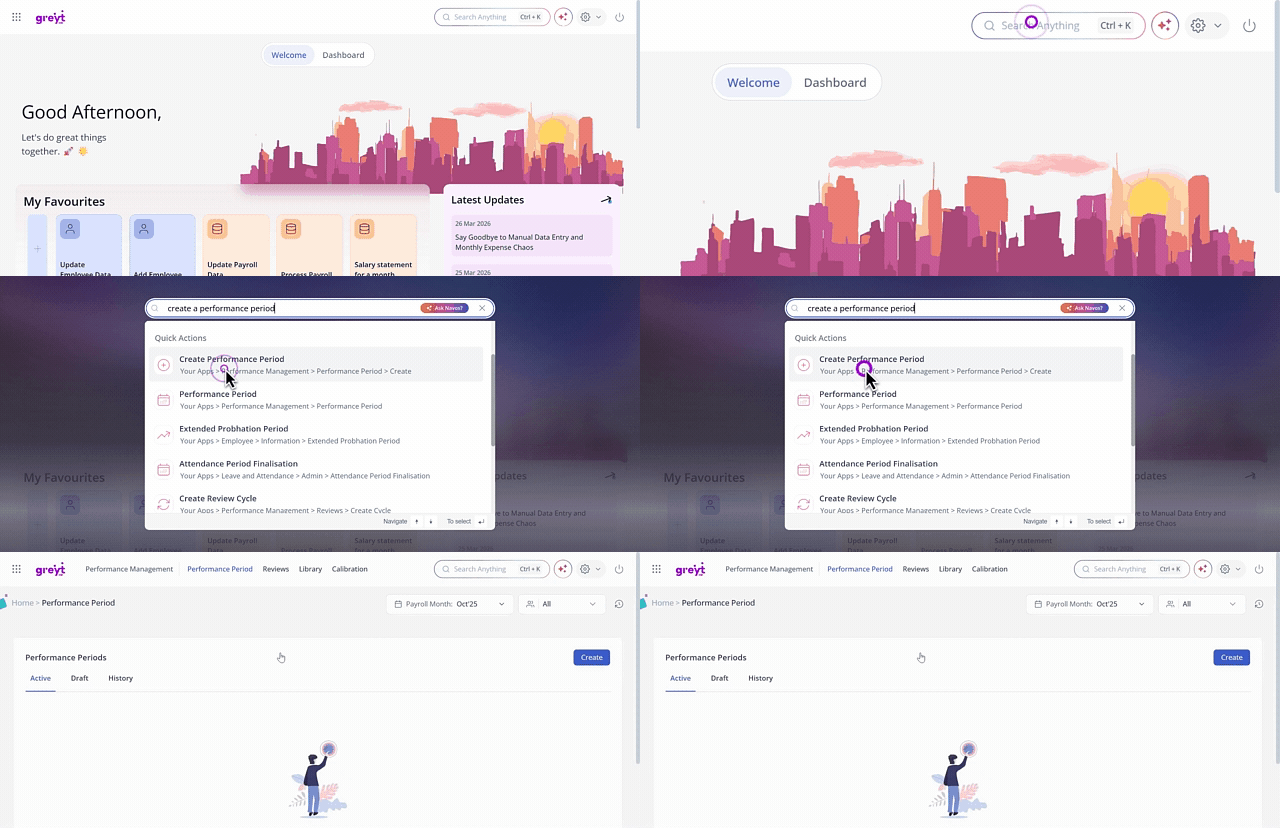
Click on the search bar and enter your query. For example, if you want to create a performance period, type “Create a performance period.” The system will display relevant results, and with a single click, you’ll be redirected to the exact page where you can complete the action.
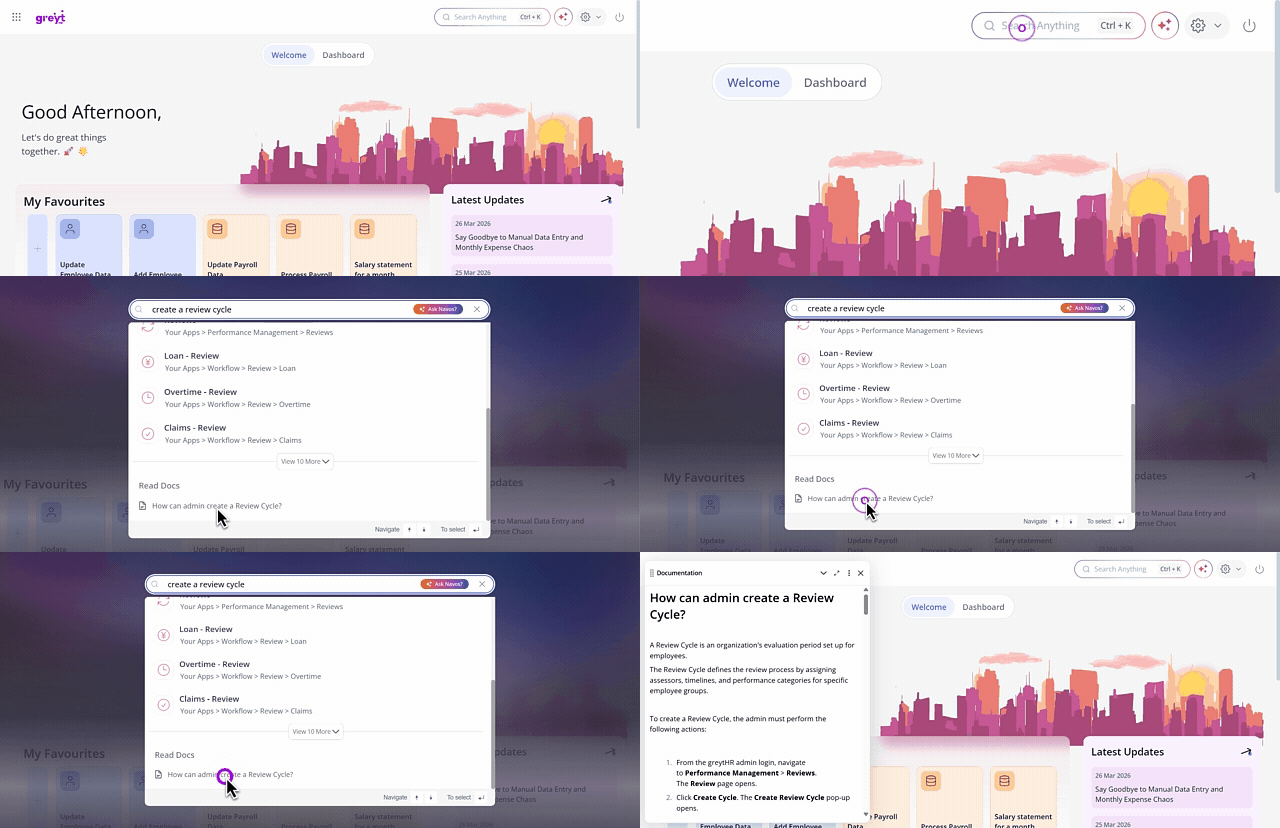
After typing your query, you can also view the detailed Knowledge Base article on the same page. Simply click on the document, and it will open instantly for you to read.
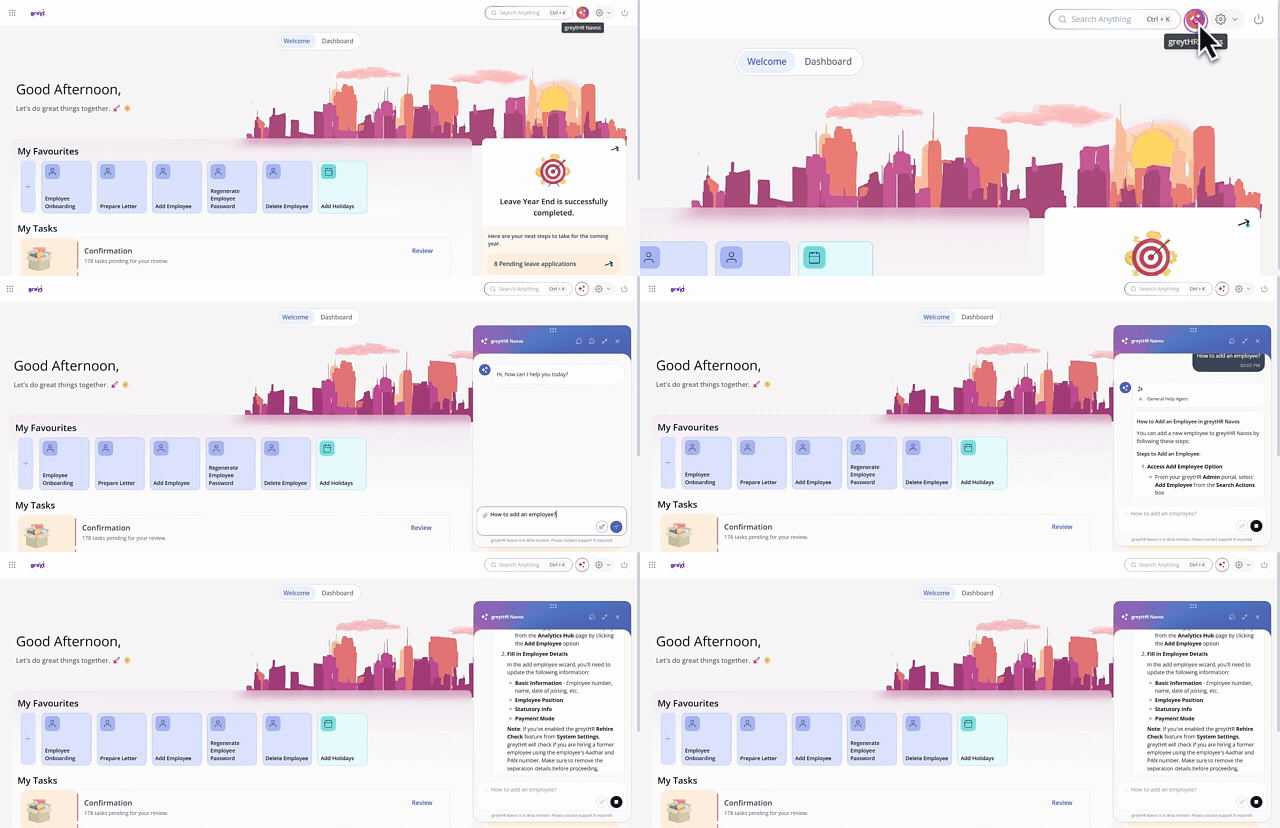
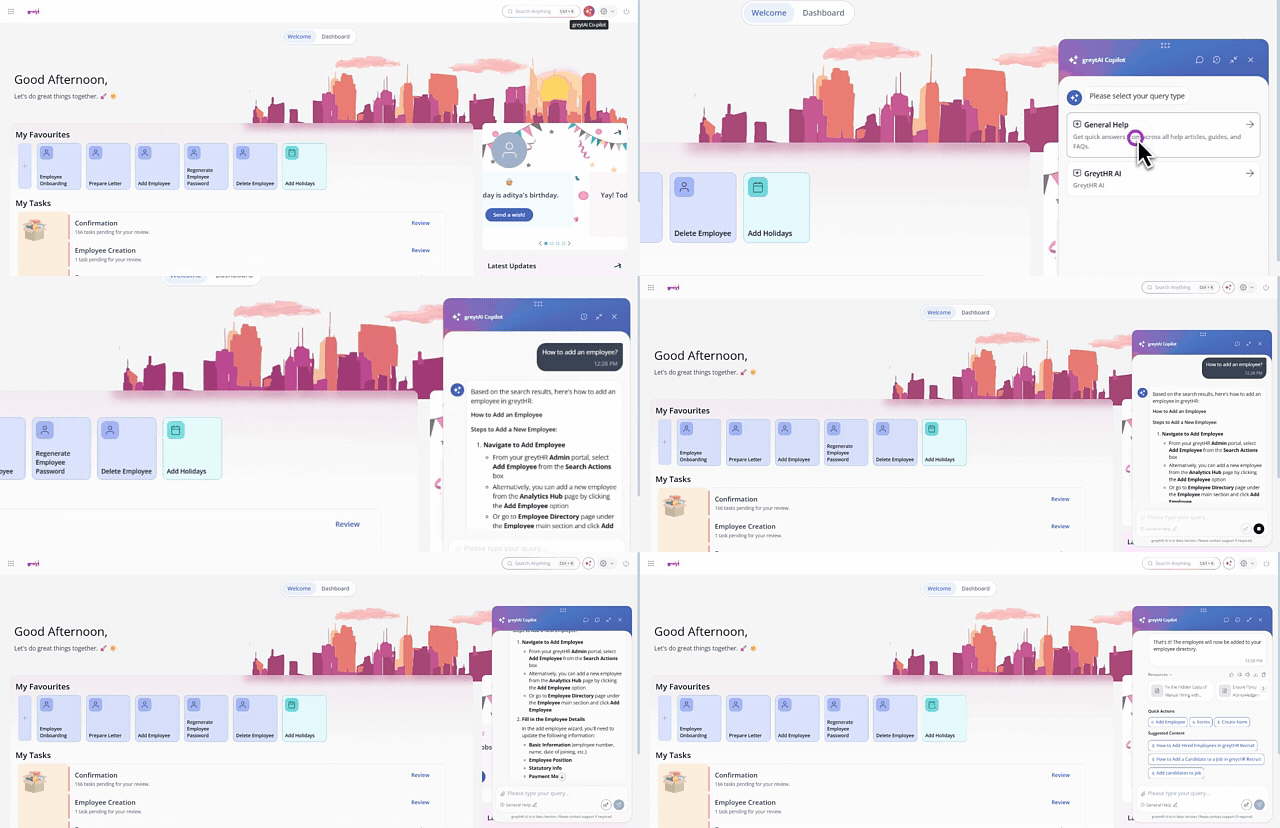
2. Click on the chat icon/widget and enter your query. For example, you might ask, “How to add a new employee?” The AI-enriched chatbot will then respond with a detailed step-by-step guide, share links to relevant knowledge base articles, or even navigate you directly to the relevant page.
Info:
The Quick Actions option redirects you to the page where you can take the required action instantly.
You can view the detailed Knowledge Base article from the Suggested Content section.
You can provide feedback, use the Read Aloud option to listen to the chat content, and either download or copy the content as needed.
You can use voice-based search and interact in regional languages for a more personalized experience.

Raise a support ticket
You can also raise a support ticket using NAVOS and get assistance or updates on your existing queries.
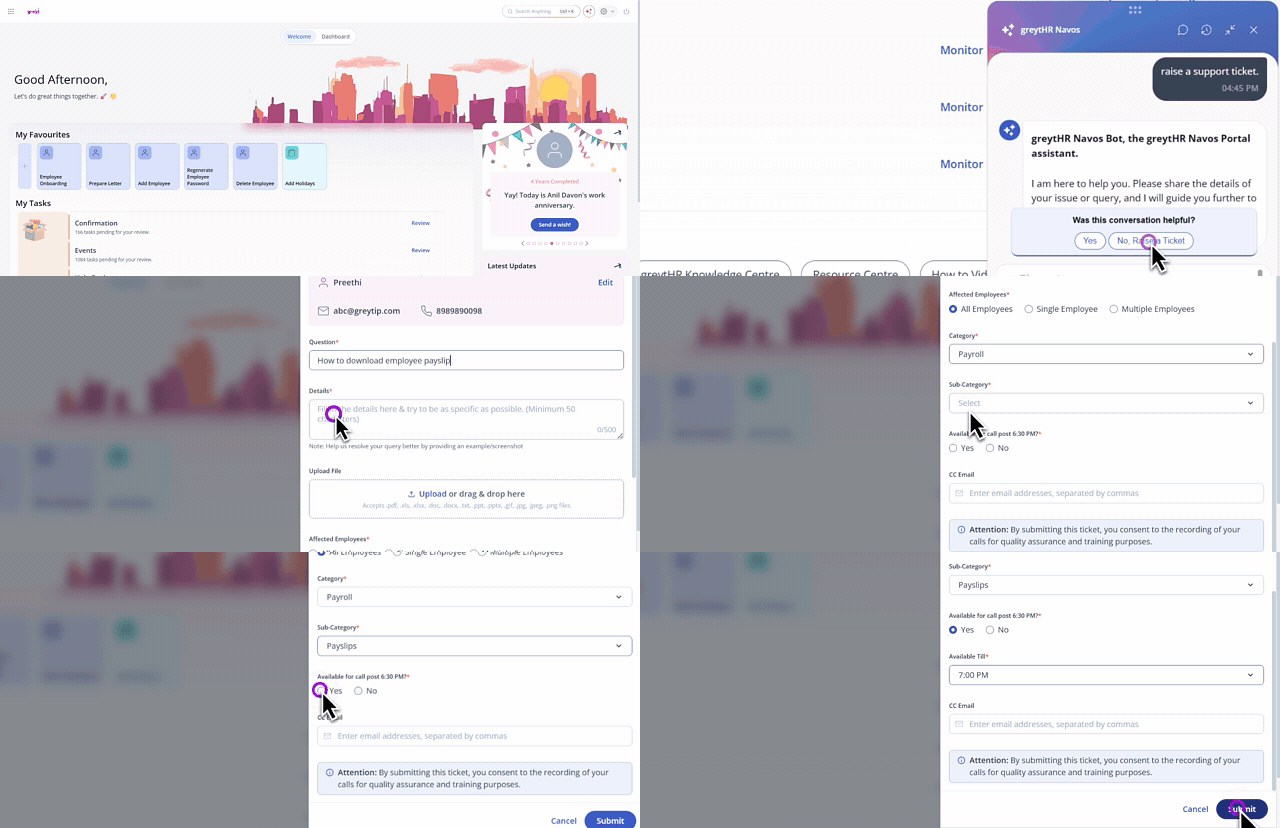
Click on the search bar and then type Raise a Support Ticket.
Select the Chat with Navos/Raise a Support Ticket option.
Once the chatbot appears, enter your query to find a resolution. If the response doesn't meet your needs, type that you want to raise a support ticket.
From the feedback pop-up, choose "No, Raise a Ticket" from the feedback popup.
If the user info is not filled, enter your name, email address, contact number, and preferred language and click Save.
To make any changed, click the Edit option, make the changes and save it.
In the Question text box, enter your query.
In the Details text box, mention any specific details about your query.
You can also upload any attachments as required.
Choose whether the issue affects all employees, a single employee, or multiple employees.
Select the required Category and Sub-category.
Indicate if you are available for a call after 6:30 PM by choosing Yes or No.
Optionally enter CC email addresses, separated by commas.
Click Submit to raise your request.
Frequently Asked Questions
What is NAVOS?
NAVOS is an AI-powered assistant within greytHR that simplifies navigation, provides instant answers, and helps you complete tasks faster through intelligent search.
What are the key components of NAVOS?
NAVOS consists of three main components:
AI-Enriched Search: A universal search bar that understands natural language queries and delivers relevant results across all greytHR modules, reports, settings, and knowledge base.
AI Co-pilot: An assistant that can complete critical or complex actions instantly based on simple requests (e.g., "Add LOP for [employee name] on [date]").
AI-Enriched Chatbot: A responsive, context-aware chatbot that provides conversational answers and helps resolve queries faster than traditional support bots.
How does NAVOS address the existing challenges with greytHR?
NAVOS enhances the navigation, feature discoverability, and the effort needed to find information by:
Providing instant answers through the chatbot.
Guiding users to specific modules or settings via the AI-Enriched Search.
Helping you unlock the full value of greytHR without endless searching or support help.
How does NAVOS help improve productivity?
NAVOS boosts productivity by reducing the time spent searching for information or navigating multiple menus.
For example, earlier, to add LOP for an employee, you had to navigate through Payroll > Payroll Inputs > Employee LOP Days > Add LOP Days and then select the employee to enter details.
With NAVOS, you can simply type “Add LOP for [employee name] on [date]”, and it will take you directly to the Employee LOP Days page—no more multiple steps or manual navigation.
What are the main benefits of using NAVOS?
The main benefits include:
Enhancing efficiency and productivity by reducing time spent searching and automating tasks.
Providing instant answers to queries.
Helping to discover hidden features within greytHR.
Simplifying navigation with a universal search bar.
Reducing support dependency by resolving routine queries instantly.
Maximizing the overall value and usage of the greytHR platform.
Why do I need NAVOS?
It saves time, reduces the effort of searching through menus, makes hidden features more discoverable, and allows you to complete complex actions with a simple command.
How do I use NAVOS?
You can use NAVOS in two ways, depending on your need:
Via the Search Bar (for search/navigation/action): Click on the search bar and enter your query in natural language (e.g., "Create a performance period"). The system will display relevant results and can redirect you to the exact page.
Via the Chat Icon/Widget (for conversational answers): Click on the chat icon/widget, select an agent, and enter your query (e.g., "How to add a new employee?"). The chatbot will respond with a step-by-step guide, links to knowledge base articles, or navigate you directly to the relevant page.
Can NAVOS actually complete tasks for me?
Yes, NAVOS is designed to help you complete critical or complex actions instantly. You can make a request like, "Add LOP for (employee name) on (date)," and the co-pilot will execute the action and show you the result.
Will the chatbot only answer questions?
No. The AI-enriched chatbot not only answers queries but can also provide step-by-step guides, link you to relevant knowledge base articles, or directly navigate you to the correct page.
Can I view the Knowledge Base articles through the search bar?
Yes. After typing your query in the search bar, you can view the detailed Knowledge Base article on the same page. Simply click on the document, and it will open instantly.
Are there any extra features in the AI-Enriched Chatbot?
Yes, the chatbot allows you to provide feedback, use the Read Aloud option to listen to the chat content, and either download or copy the content as needed.
You can use voice-based search and interact in regional languages for a more personalized experience.
The Quick Actions option redirects you to the page where you can take the required action instantly.
You can view the detailed Knowledge Base article from the Suggested Content section.

Will the AI features slow down the greytHR platform?
NAVOS features are integrated to increase your efficiency and productivity by reducing the time you spend searching or clicking. They are optimized to work seamlessly within the platform without negatively impacting the overall speed or performance of greytHR.
Do I need to use specific terms or complex commands when asking queries?
No. NAVOS uses Natural Language Processing (NLP) to understand your intent and context. This means you can simply type or speak your queries in plain, everyday language, and it will interpret and respond accurately.
Is it mandatory to use NAVOS?
No. The traditional menu-based navigation you are familiar with is still fully operational and hasn't changed. NAVOS (AI Search and assistant) is an optional layer designed to help you get things done even faster. You can think of it as a powerful shortcut that saves you clicks and time, especially for tasks you do occasionally or complex actions you need to perform quickly.
Is my data safe when using NAVOS?
Yes. Your data remains completely secure. The AI operates within greytHR’s encrypted environment and only accesses information you have already given permission to use. It’s built to enhance your experience without compromising data security.
What if the AI misunderstands my request or makes mistakes?
The AI is designed to be intuitive and continuously learns from interactions. For complex actions, it will always confirm with you before execution to avoid errors. Over time, it becomes smarter and more accurate—and if needed, the support team is always there to assist.
How can an admin raise a support ticket using NAVOS?
Admins can raise a support ticket directly through the NAVOS to get help or updates on their existing queries.
Click on the search bar and then type Raise a Support Ticket.
Select the Chat with Navos/Raise a Support Ticket option.
Once the chatbot appears, enter your query to find a resolution. If the response doesn't meet your needs, type that you want to raise a support ticket.
From the feedback pop-up, choose "No, Raise a Ticket" from the feedback popup.
Click Edit, enter your name, email address, contact number, and preferred language and click Save.
In the Question text box, enter your query.
In the Details text box, mention any specific details about your query.
You can also upload any attachments as required.
Choose whether the issue affects all employees, a single employee, or multiple employees.
Select the required Category and Sub-category.
Indicate if you are available for a call after 6:30 PM by choosing Yes or No.
Optionally enter CC email addresses, separated by commas.
Click Submit to raise your request.
Related articles:
Was this article helpful?
More resources:
▶ Video - Watch our how-to videos to learn more about greytHR.
📢 Product Update - Read about the product updates.