Workforce Management Menu in greytHR: Features, Navigation & FAQs
Updated in July - 2026 | Subscribe to watch greytHR how-to video
greytHR's Leave & Attendance module has a new name — Workforce Management. This update marks a significant step in greytHR's evolution, setting the foundation for a more comprehensive workforce experience.
All existing data, configurations, and workflows remain intact — only the name and navigation structure have been updated.
This change also introduces a restructured navigation with clearly grouped menus, making it easier for you to find the tools and settings you need — without having to hunt through unrelated sections.
What's new in the Workforce Management menu?
The Workforce Management menu replaces the earlier Leave and Attendance label in the primary header.
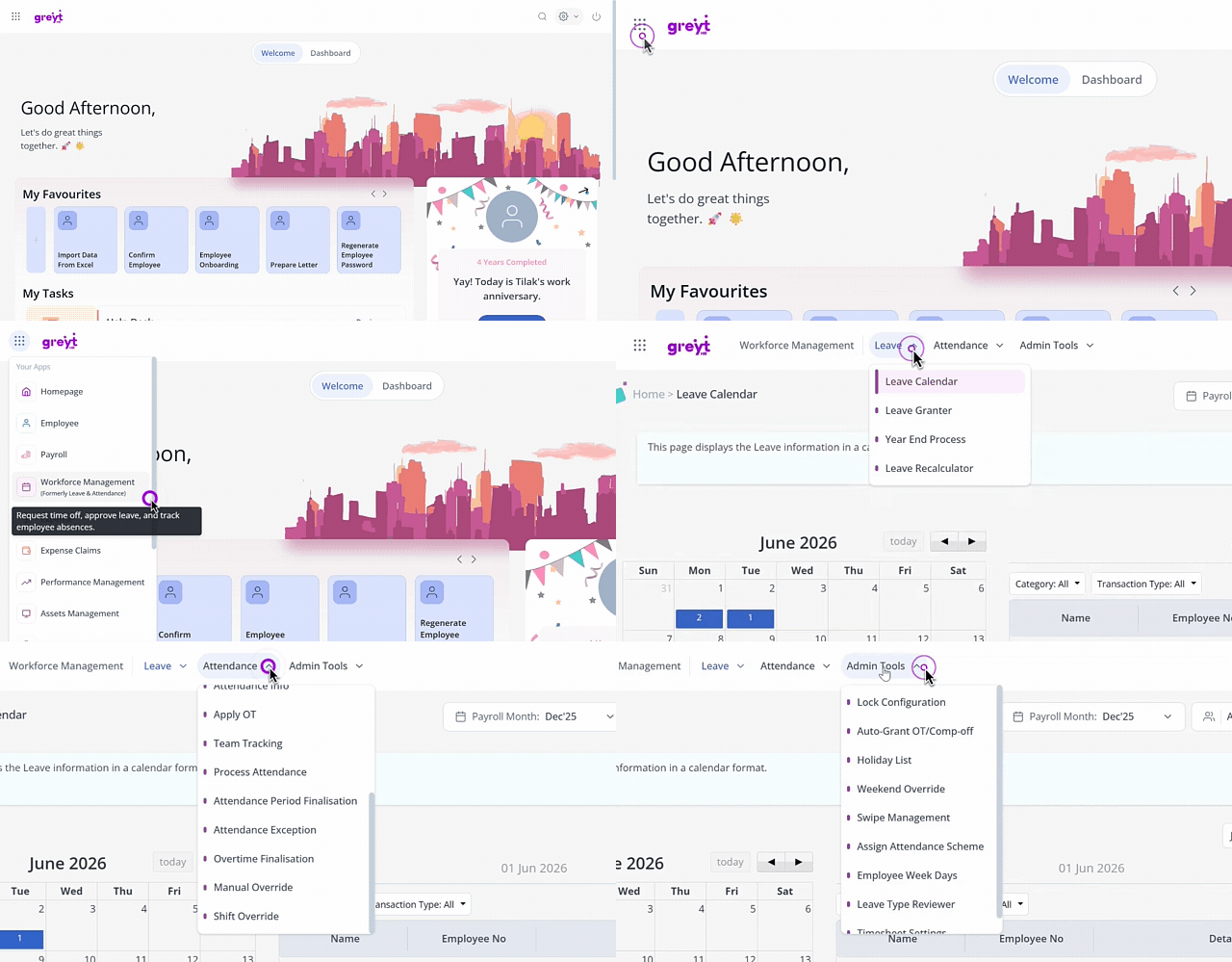
The navigation is now organized into the following groups:
| Menu group | What you'll find here |
|---|---|
| Leave | Leave overview, leave calendar, employee leave, and other leave management pages |
| Attendance | Attendance overview, employee attendance, and attendance management pages |
| Admin Tools | Administrative actions for leave, attendance like setting up holiday list, lock configuration etc |
What remains unchanged after the Workforce Management update?
All your existing leave and attendance pages are accessible exactly as before — only the label and navigation grouping have changed.
All existing URLs and deep links to leave and attendance pages continue to work without any changes.
Clicking Workforce Management in the header takes you to the Leave Overview page by default.
You only see the menu items and tabs that you are authorized to access, based on your permissions.
How to access Workforce Management in greytHR
To access any leave or attendance page, from the greytHR Admin portal, hover over the 9 dots and go to Workforce Management > Leave > Required page.
For example:
To view the Leave Calendar: go to Workforce Management > Leave > Leave Calendar.
To view Attendance Overview: go to Workforce Management > Attendance > Attendance Overview.
Note: If you have saved bookmarks or shared direct links to Leave and Attendance pages, those links remain functional and will continue to work.
Workforce Management FAQs
What is Workforce Management menu in greytHR?
The Workforce Management menu is the renamed and restructured version of the earlier Leave and Attendance section in the greytHR Admin portal. It brings leave, attendance, and future timesheet management together under one unified navigation experience with clearly grouped menu tabs.
Why is the Leave and Attendance section renamed to Workforce Management?
greytHR is expanding its capabilities to include Timesheets and other workforce tools beyond leave and attendance. The rename to Workforce Management reflects this broader scope and helps you navigate to all related features from one place.
Can all admins see the Workforce Management menu and all its sub-items?
Admins can only see the tabs and menu items that you are authorized to access based on your role and permissions.
Are Timesheet pages available now under the Workforce Management menu?
Yes. Timesheet pages will be available under the Timesheets menu group in a subsequent phase. If you do not see the Timesheets section yet, it will be enabled once it is live for your account.
Is this change applicable to both Admin and Employee Self-Service (ESS) portals?
This navigation change applies to the greytHR Admin portal. ESS portal navigation is not affected by this update.
Can the old Leave & Attendance navigation be retained?
No, it is not possible to retain the old navigation. The rename to Workforce Management is a platform-wide update and applies to all accounts automatically.
Was this article helpful?
More resources:
▶ Video - Watch our how-to videos to learn more about greytHR.
📢 Product Update - Read about the product updates.