Enable accurate field attendance with GPS Live Tracking
Updated in July - 2026 | Subscribe to watch greytHR how-to video
Managing attendance for field employees can be challenging due to limited visibility into their actual work locations, travel timelines, and sign-in authenticity. Manual reporting or location-agnostic attendance often leads to inaccuracies, compliance gaps, and difficulty in validating work hours.
GPS Live Tracking in greytHR addresses these challenges by enabling location-based attendance verification, especially for field employees. The feature captures and validates an employee’s location only during active sign-in hours, helping organizations ensure accurate attendance, monitor movement during work hours, and stay compliant with defined attendance policies.
Benefits of GPS Live Tracking in greytHR
Ensures accurate attendance by validating employee location at sign-in, during work, and sign-out.
Provides managers the visibility into employee work timelines, travel paths, and on-site presence.
Provides geo-fence control to prevent false check-ins.
Simplifies compliance and review with detailed travel logs.
Supports field workforce accountability without manual follow-ups.
Enable GPS Live Tracking feature
From the greytHR Admin portal go to Settings > Account Settings > New Features.
From the list of features displayed, select Live Tracking, click the Enable this feature checkbox, and click Confirm.
Next, select Geo Tracking, click the Enable this feature checkbox, and click Confirm.
Note: To enable the features, you need to contact the greytHR Support Team.
Configure access rights for GPS Live Tracking
Once the feature is enabled next important step is to configure access rights for the feature within greytHR.
From the greytHR Admin portal, go to Settings icon > User Administration > User > User Roles.

Select the required user role card - employee or manager, and click the Edit icon.
From Category, select Geo Live Tracking. The related features appear.
If you are enabling it for employees;
Select the Read Access and Write Access checkboxes for the feature My Live Tracking.
If you are enabling it for managers, select the Read Access and Write Access checkboxes for the feature Team Live Tracking and click Save.
Enable Live Tracking for GPS-based attendance
For the GPS Live Tracking feature to work, you must configure Live Tracking as swipe-capturing method. To do this, go to Settings > System Settings > Attendance > Attendance Scheme.
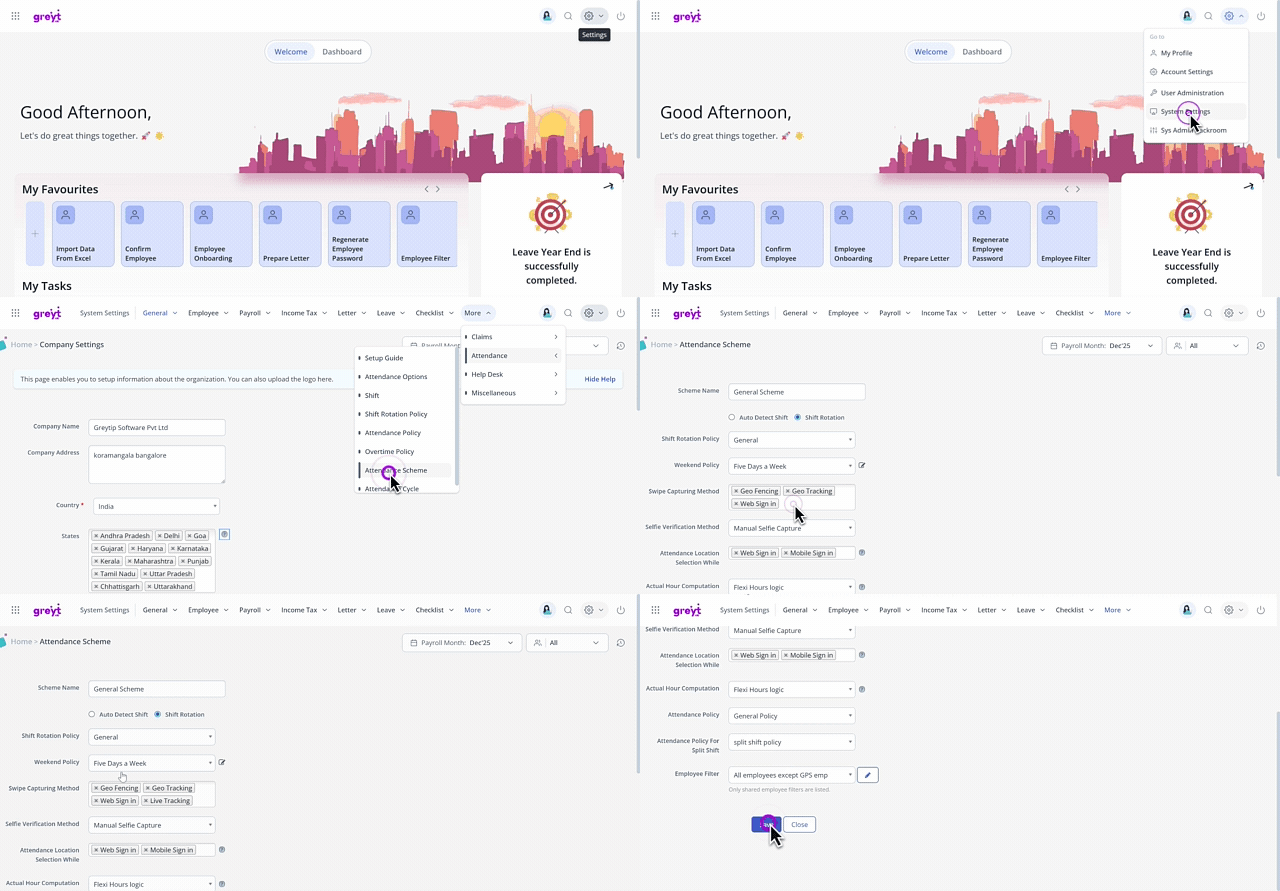
Select the required attendance scheme for which you want to configure the GPS Live Tracking and click the Edit icon.
From the Swipe Capturing Method list, select Live Tracking and Geo Tracking.
Click Save to update the changes.
Note: For the GPS Live Tracking feature to work correctly, ensure that both Live Tracking and Geo Tracking
(Sign-in/Sign-out) are enabled. If either setting is disabled, the feature will not function.
Best practises for using GPS Live Tracking
GPS Live Tracking depends on the device’s GPS and network availability, so minor location differences may occur.
GPS accuracy may be affected in lifts, basements, underground parking areas, large buildings, or places with weak network coverage.
Even when GPS is turned on, location signals may be temporarily unavailable.Location permission is required to capture live tracking data. If permission is denied, GPS Live Tracking will not work.
Battery saver or power optimization settings on the device may restrict GPS tracking.
For best results, GPS, mobile data, and required app permissions should be enabled.
Use one device per user. Using multiple devices or sharing devices can result in incorrect tracking data.
Small variations in distance, travel time, or visits are expected due to GPS limitations.
View GPS Live Tracking reports
Once GPS Live Tracking is configured and employees begin signing in, admins can generate detailed GPS-based attendance reports from the Report Gallery.
Three reports are available under the Attendance category. Only Admins with Read/Write access can view and generate these reports. To configure access rights
From the greytHR Admin portal, go to Settings icon > User Administration > User > User Roles.
Select the admin user role card and click the Edit icon.
From Category, select GPS Live Tracking. The related features appear.
Select the Read Access and Write Access checkboxes for the features GPS Check-In and Check-Out Summary Reports, GPS Daily Summary Report, GPS Event Wise Summary and click Save.
To view the GPS Live Tracking reports, from the greytHR Admin portal, hover over the 9 dots and go to Reports > Report Gallery > All Reports > Attendance.
GPS Daily Summary
This report provides a daily summary of each employee's GPS attendance, including sign-in/sign-out times, work hours, travel time, distance covered, and number of visits.
From the greytHR Admin portal, hover over the 9 dots and go to Reports > Report Gallery > All Reports > Attendance > GPS Daily Summary.
Select a From Date and To Date.
Under Employee, choose All Employees or Selected Employees.
From the Options dropdown, select up to 4 fields to include.
Click Generate and choose Excel (.xls), Excel (.xlsx), or PDF.
Available fields: First Sign In, Last Sign Out, Actual Work Hours, Total Work Hours, GPS Lost Time, Travel Time, Distance Traveled, Number of Visits.
GPS Event Wise Summary
This provides event-level GPS movement data for employees, including event time, location, address, travel time, distance, and remarks.
To generate the report, from the greytHR Admin portal, hover over the 9 dots and go to Reports > Report Gallery > All Reports > Attendance> GPS Event Wise Summary.
Select a From Date and To Date.
Under Employee, choose All Employees or Selected Employees.
From the Options dropdown, select up to 4 fields to include.
Click Generate and choose Excel (.xls), Excel (.xlsx), or PDF.
Available fields: Event Time, Location Name, Address, Travel Time, Distance Traveled, Time, Remarks
GPS Check-In & Check-Out Summary
The check-in and check-out details for each employee, including location, address, timestamps, time spent, and remarks are all available in this report
To generate the report, from the greytHR Admin portal, hover over the 9 dots and go to Reports > Report Gallery > All Reports > Attendance> GPS Check-In & Check-Out Summary.
Select a From Date and To Date.
Under Employee, choose All Employees or Selected Employees.
From the Options dropdown, select up to 4 fields to include.
Click Generate and choose Excel (.xls), Excel (.xlsx), or PDF.
Available fields: Check-In Time, Check-In Location Name, Check-In Address, Check-In Remarks, Check-Out Time, Check-Out Location Name, Check-Out Address, Check-Out Remarks, Time Spent
Frequently Asked Questions
What is GPS?
GPS (Global Positioning System) is a satellite-based technology that provides accurate real-time information about the location and movement of a device. It is widely used for navigation, tracking, and workforce management.
What is greytHR GPS Live Tracking?
greytHR GPS Live Tracking is an attendance-native, consent-based feature that provides visibility into employee working hours between Sign-In and Sign-Out by capturing location movement and timeline data during work hours.
Why is GPS Live Tracking introduced?
GPS Live Tracking is designed to close the visibility gap in on-field attendance by creating a transparent and auditable record of working hours beyond punch-point attendance.
For whom is GPS Live Tracking best suited for?
GPS Live Tracking is best suited for organisations with on-field or mobile employees such as:
Field sales teams
Service and maintenance staff
Distributed workforce roles
Delivery & Logistics Teams
Relationship Managers / On-ground Ops
Healthcare Field Staff
How can admins enable the GPS Live Tracking feature in greytHR?
GPS Live Tracking can be enabled at the attendance scheme level within greytHR. Admins can choose which employee groups or roles it applies to and roll it out gradually.
To enable the GPS Live Tracking feature, from the greytHR Admin portal, go to Settings > Account Settings > New Features.
From the list of features displayed, select Live Tracking, click the Enable this feature checkbox, and click Confirm.
Next, select Geo Tracking, click the Enable this feature checkbox, and click Confirm.
Note: To activate GPS Live Tracking, admins must contact the greytHR Support Team. The feature will be enabled for the admins account only after support confirmation.
Can GPS Live Tracking be enabled only for specific teams?
Yes. GPS Live Tracking can be enabled selectively based on attendance schemes, allowing admins to apply it only to field or mobile roles where it is required.
Can GPS Live Tracking be enabled only for selected employees?
Yes. GPS Live Tracking can be enabled for a subset of employees, depending on business requirements.
Is GPS Live Tracking mandatory for all employees?
No. It is optional and can be enabled only where attendance verification beyond punch points is required.
How can admins enable GPS Live Tracking for employees?
To enable GPS Live Tracking for employees:
From the greytHR Admin portal go to Settings > User Administration > User > User Roles.
Select the employee user role card, and click the Edit icon.
From Category, select Geo Live Tracking.
Enable Read Access and Write Access for My Live Tracking and click Save.
How can admins enable GPS Live Tracking for managers?
To enable GPS Live Tracking for managers:
From the greytHR Admin portal go to Settings > User Administration > User > User Roles.
Select the manager user role card, and click the Edit icon.
From Category, select Geo Live Tracking.
Enable Read Access and Write Access for Team Live Tracking and click Save.
Why is GPS Live Tracking not working even after enabling it?
GPS Live Tracking requires two settings to be enabled simultaneously. Turning on only one of them will prevent the system from capturing or displaying location data.
Both of the following must be active in your admin settings:
Live Tracking — enables real-time location monitoring
Geo Tracking — records employee sign-in and sign-out locations
If either setting is off, go to Admin Settings and enable the settings.
Is it mandatory to enable access for both employees and managers?
Yes. GPS Live Tracking works correctly only when access rights are enabled for both employees and managers. Employees use it to capture attendance, and managers use it to view and review team tracking details.
Why can’t employees see the GPS Live Tracking option?
Employees may not see GPS Live Tracking if:
The feature is not enabled under New Features.
Live Tracking is not selected as the swipe-capturing method in the attendance scheme.
Required access rights are not enabled for the employee role.
Location permission is not granted on the mobile device.
Why can’t managers view team GPS tracking details?
Managers may not be able to view team tracking details if:
Team Live Tracking access is not enabled for the manager role.
Employees have not signed in using GPS Live Tracking.
GPS or network availability is limited on employee devices.
Does GPS Live Tracking work only on mobile?
Yes. GPS Live Tracking is a mobile-first feature available through the greytHR mobile app. Web and ESS access are planned as part of the future Roadmap.
When does GPS tracking start and stop?
Tracking starts automatically when an employee Signs In and stops when they Sign Out. There is no tracking outside working hours.
Is it necessary to keep the greytHR mobile app running in the background?
Yes. The greytHR mobile app must be allowed to run in the background for continuous tracking.
Can employees close the app during the day?
Employees can minimize the app, but they should not close it completely. Closing the app may interrupt tracking.
Does closing the greytHR app count as check-out?
No. Closing the gretHR app does not mark a check-out.
What information is captured during working hours?
GPS Live Tracking captures:
Location at Sign-In and Sign-Out
Movement and travel during working hours
Check-ins and check-outs (if used)
Unmapped stops
Recorded gaps when GPS is unavailable
All captured data is organised into a chronological timeline of working hours.
Is tracking continuous throughout the day?
Tracking is work-hours-based and consent-driven. It runs only between Sign-In and Sign-Out, and does not track outside the attendance window.
Will travel route and distance be captured even without check-ins/check-outs?
Yes. Even if employees do not manually check-in or check-out, the system can still capture the route and distance travelled between Sign-In and Sign-Out.
How frequently does the system capture location updates?
Location capture is adaptive and depends on factors such as device performance, GPS availability, and network conditions. However, the system is designed to capture updates at an average frequency of less than 30 seconds.
Will admins and managers see the same information as employees?
Yes. Managers and admins can view the same tracking timeline information as employees, based on role-based access permissions.
What information can admins view?
HR admins have access to audit-ready working-hour records, including timelines, summaries, and recorded exceptions.
Who controls access to tracking data?
Access is role-based:
Employees see only their own data
Managers see their team’s data
HR/Admins have oversight access for review and audit
This can be assigned by the admin at the time of configuration.
Is employee consent required?
Yes. GPS Live Tracking is consent-based. Employees must explicitly allow location access on their device for tracking to work.
How accurate is GPS tracking?
GPS accuracy depends on your device's GPS module and your physical location. In most cases, accuracy is within 16 metres, approximately 96% accurate. At speeds above 80 km/h, accuracy may reduce slightly but remains above industry benchmarks.
Is employee approval required during first-time login?
Yes. Employee consent is taken during the first-time login to ensure responsible and transparent usage.
Is GPS Live Tracking surveillance?
No. GPS Live Tracking is designed for attendance verification, not surveillance. Tracking is limited to work hours and governed by consent and role-based access.
Is location tracked outside work hours?
No. Tracking is strictly work-hours-bounded and remains inactive outside Sign-In and Sign-Out.
How does greytHR ensure responsible usage?
greytHR ensures responsible usage through:
Consent-based tracking
Work-hours-bounded tracking
Role-based access control
Transparent timelines visible to employees
Can GPS Live Tracking prevent false or proxy attendance?
Yes. Since attendance is marked only when the employee is physically within the geo-fence, it helps prevent false or unauthorized check-ins.
What happens if GPS or internet is lost?
If GPS or internet is unavailable due to device settings, connectivity, or environment, the system records the period as a gap (GPS lost) instead of hiding the data. Tracking resumes automatically once connectivity is restored.
What happens if the employee turns off location services during working hours?
If location services are turned off, no GPS coordinates are captured, stored, or transmitted during that period. The system marks the employee as GPS lost for that duration.
Does the system record if the employee deliberately turns off GPS/data/location?
If GPS, data, or location is disabled, the system captures the gap in the timeline as GPS lost.
Will the system automatically sign out if there is a signal issue?
No. Signal issues do not trigger auto sign-out. Instead, the timeline records the duration as GPS lost.
What happens if the employee misses check-out from a location?
If the employee forgets to check-out from a location, the system automatically checks out when the employee signs out for the day.
What happens if the employee does not sign out at the end of the day?
If the employee does not sign out, tracking may continue until the session refreshes (typically around midnight for standard shift cases).
Can GPS Live Tracking be paused temporarily during breaks?
There is no separate pause option in MVP. If employees turn off location manually, the system will record that period as GPS lost.
Can employees use both geo-fencing (for office sign-in) and GPS Live Tracking (for field work) on the same day?
Yes. The system supports hybrid attendance — an employee can sign in via geo-fencing at the office and have their field movement captured via GPS Live Tracking. However, this combined workflow is currently managed as two separate features. A single integrated workflow is under consideration for a future release.
Where can admins view GPS tracking details?
Admins can view employee timelines, travel data, and current status (e.g., in transit, at client location, signed out) directly from the greytHR web portal.
Should web sign-in be disabled for employees on a GPS Live Tracking scheme?
Yes. If GPS Live Tracking is to be enforced, web sign-in should be disabled for those employees. Web sign-in does not capture location data and would allow attendance to be marked without any GPS record.
Will check-ins and check-outs with remarks be available in reports?
Check-ins and check-outs with location details are available in the timeline view.
Are MIS reports available for GPS Live Tracking?
MIS reports are not included in the MVP release. Reporting enhancements will be taken up after the MVP rollout.
How long will GPS Live Tracking data be available?
Currently, GPS Live Tracking data is available for the last 90 days as historical records.
What Android version is required for GPS Live Tracking?
GPS Live Tracking requires Android 8.1 and above.
What iOS version is required for GPS Live Tracking?
GPS Live Tracking requires iOS 16 and above.
Does GPS Live Tracking support both Android and iOS?
Yes. GPS Live Tracking is supported on both Android and iOS platforms.
Does GPS Live Tracking impact mobile battery?
Battery drain may occur similar to other GPS-based applications. Battery usage depends on the device model, GPS usage, and network conditions.
Is GPS Live Tracking included in all plans?
No. GPS Live Tracking is available as a paid add-on for eligible plans that include the Attendance module.
Are there any additional setup or integration fees?
No. GPS Live Tracking is built into greytHR Attendance and does not require any separate setup or integration fees.
Is GPS Live Tracking available for Essential plan customers?
No. GPS Live Tracking is available only for plans that include the Attendance module. Since the Essential plan does not include Attendance, it is not eligible for GPS Live Tracking.
Customers on Essential must upgrade to a plan that includes Attendance to use this feature as an add-on.
If GPS Live Tracking is enabled for an employee for one day, will billing apply only for that day?
No. Once enabled for an employee, billing is applicable for the full month.
Does enabling GPS Live Tracking automatically disable geo-tagging billing?
When GPS Live Tracking is activated for an employee, geo-tagging is included as part of the feature. Organizations should not be billed separately for geo-tagging once Live Tracking is enabled. Verify the first month's billing to ensure geo-tagging and Live Tracking are not both charged.
What happens if Live Tracking is enabled in the attendance scheme, but “View My Tracking” is not enabled in the user role?
If Live Tracking is configured correctly in the attendance scheme but the View My Tracking permission is disabled in the employee’s user role, the employee can still sign in successfully. However, on accessing View My Tracking, the employee is taken to the timeline page where the check-in option is hidden and an empty state message is shown, prompting the employee to contact HR to enable the required access.
How much mobile data does GPS Live Tracking consume?
Data consumption varies by network type (5G, 4G) and usage patterns. In internal testing, GPS tracking for a full 12-hour day consumed less than 250 MB assuming no other apps were heavily used. This is comparable to other GPS or mapping applications.
Why can GPS data only be stored for 90 days?
The 90-day retention limit is due to the volume of GPS data captured and vendor infrastructure constraints. This is consistent with industry standards — Google also limits location history to 3 months by default. Customers should download reports regularly to retain records beyond 90 days.
Can GPS data be exported for record-keeping?
MIS reports are not included in the current release. Reporting enhancements are planned for a future phase. Once available, reports will include employee name, date, distance covered, travel time, number of visits, check-in details, and sign-in/sign-out times in Excel and PDF formats. Until then, admins are encouraged to download available data regularly as records are stored for only 90 days.
Can the tracking frequency or location update interval be customised?
No. The tracking interval is not configurable. The system captures location continuously and adaptively — on average less than every 30 seconds. This is more accurate than fixed-interval polling solutions.
Does GPS Live Tracking work offline?
Offline tracking with auto-sync is planned for a future phase. In the current release, an active internet connection is required for real-time location capture and sync. If connectivity is lost, the gap is recorded as GPS Lost and tracking resumes when connectivity is restored.
What location permission should employees select on their device for GPS tracking to work?
Employees must provide the location permission always or all the time. Selecting 'Allow Only While Using the App' will not support tracking when the app is running in the background. If employees select this option, tracking will stop whenever the greytHR app is not in the foreground.
Are MIS reports available for GPS Live Tracking?
Yes. Three GPS reports are now available under the Attendance Reports category in the Report Gallery — GPS Daily Summary, GPS Event Wise Summary, and GPS Check-In & Check-Out Summary.
Can GPS data be exported for record-keeping?
Yes. Admins can generate and export GPS reports in Excel (.xls), Excel (.xlsx), or PDF format. Available reports include GPS Daily Summary, GPS Event Wise Summary, and GPS Check-In & Check-Out Summary. Records are stored for 90 days, so admins must download reports regularly.
Related articles:
Various employee attendance marking methods using greytHR ESS
View employees' attendance information at a glance
Was this article helpful?
More resources:
▶ Video - Watch our how-to videos to learn more about greytHR.
❓ FAQs - Solve your queries using FAQs.
📢 Product Update - Read about the product updates.